

- A bad week exposes weak prioritization, so the system must rely on simple rules you can execute under pressure.
- Time management works best when it protects important, non-urgent work before urgent noise expands.
- Planning should shrink to a “minimum viable plan” during chaos, while goal setting stays stable.
- Resilience grows when task management includes recovery actions, not just deliverables.
- Efficiency improves when focus is defended with boundaries, escalation paths, and a clear “not doing” list.
Bad weeks rarely arrive with a calendar invite. They show up as a sick child, a server outage, a sudden leadership change, or a client who moves the deadline forward “just this once.” In those moments, the usual productivity advice can feel brittle. A pristine plan collapses, and a long task list becomes a source of stress rather than direction. The First Things First principle offers a different promise: a prioritisation system that still works when the week does not. Instead of worshiping urgency, it treats importance as the anchor and urgency as a constraint to manage. That shift matters because attention becomes scarce precisely when emotions run high.
In operational terms, this principle is less about heroics and more about repeatable decisions. It asks you to decide what must stay true even under strain: the outcomes that protect customers, health, revenue, and relationships. From there, it reshapes time management into a set of protective moves—short daily planning, clear trade-offs, and fewer active commitments. The goal is not to do everything faster. The goal is to keep doing the right things, even when the week tries to negotiate otherwise.
The First Things First Principle for prioritization when everything feels urgent
The core problem in a bad week is not the volume of work. Rather, it is distorted perception. Everything looks critical, so everything gets treated as critical. Consequently, decision fatigue increases, and task management turns reactive. The First Things First principle restores order by separating “important” from “urgent,” then forcing explicit choices about what earns attention first.
For many teams, urgency is loud. Email pings, chat alerts, and meetings create motion, so they feel productive. However, motion can mask missed outcomes. A reliable prioritization practice begins with a short definition: important work changes results you care about, while urgent work demands immediate response. Sometimes a task is both, yet many items are urgent only because someone delayed a decision.
Consider a fictional operations lead, Dana, supporting a 40-person service team. On Monday, two issues hit at once: a billing error affects 200 customers, and a senior manager asks for a slide deck “by end of day.” Without a principle, Dana might scramble to do both, then work late and still miss something. With First Things First, Dana names the billing error as important and urgent because it affects customers and revenue. The slide deck may be urgent politically, yet it is less important than stopping customer harm. Therefore, Dana responds to leadership with a trade-off: “Billing fix first, deck tomorrow at 10 a.m., unless you want me to pull an engineer off the fix.” The principle enables a calm escalation rather than silent overcommitment.
How to decide “first things” in 10 minutes
Bad weeks require fast thinking. Therefore, use a small set of questions that produce a ranked list. Which task prevents the biggest negative outcome? Which task unlocks others? Which commitment, if missed, damages trust the most? Those questions keep goal setting tied to consequences, not preferences.
To make this actionable, limit “first things” to three outcomes per day. Moreover, define them as results, not activities. “Restore correct invoices for affected customers” beats “work on billing.” “Ship the patch” beats “investigate.” This result-first phrasing improves focus, because it signals what “done” looks like.
What to do with the rest of the list
A system survives a bad week only if it includes a holding zone. Otherwise, your brain keeps rehearsing every open loop. Create a single capture list, then tag items as “later,” “delegate,” or “drop.” Dropping items sounds harsh, yet it is often honest. If a task has lived on the list for months, it likely lacks a real owner or value.
Importantly, this is not permission to ignore responsibilities. Instead, it is stress management through clarity. When you mark something “later,” you also set a review time. As a result, you reduce anxiety while preserving accountability. The insight is simple: a bad week punishes vague commitments, so the system must make commitments explicit.
Time management that protects focus: building a schedule that can bend without breaking
Most schedules fail during turbulence because they assume ideal conditions. Meetings run long, people interrupt, and emergencies appear. Therefore, First Things First time management uses buffers and “protected blocks” rather than a packed calendar. The intent is to defend focus, since fragmented attention makes even simple tasks take longer.
Start with a rule: schedule priorities, not preferences. That means placing your important work early in the day or at the most reliable time slot. For many people, that is the first 90 minutes. However, the best slot is the one you can consistently keep. If mornings are unpredictable due to caregiving, then late afternoon might be safer.
Dana, the operations lead, uses a “two-layer day.” Layer one holds two protected blocks for high-impact work. Layer two holds flexible tasks, like check-ins and admin. When an outage hits, Dana cancels flexible tasks first. Consequently, the calendar changes without erasing the day’s purpose.
Minimum viable planning for chaotic weeks
During a bad week, long planning sessions become a trap. They feel responsible, yet they delay action. Instead, use minimum viable planning: a five-minute morning scan, a two-minute mid-day check, and a five-minute end-of-day reset. This cadence supports productivity without adding overhead.
The morning scan picks the day’s three outcomes and confirms any deadlines. The mid-day check asks, “What changed, and what now matters?” The end-of-day reset closes loops and prepares the next morning. Moreover, this rhythm reduces after-hours rumination, because your mind trusts that nothing important will be forgotten.
Boundary tools that keep your calendar honest
Focus needs social support. Therefore, set expectations with simple scripts. “I can meet for 15 minutes today or 30 minutes tomorrow.” “If it’s urgent, please call; otherwise message.” These lines create channels for true emergencies while protecting deep work.
Use a lightweight escalation ladder as well. For instance, define what counts as a “drop everything” issue: safety, major customer impact, or legal risk. Everything else goes into triage. As a result, your efficiency improves because you stop switching contexts for minor problems.
| Situation | Default reaction | First Things First response | Why it improves resilience |
|---|---|---|---|
| Inbox flood on Monday morning | Answer everything immediately | Triage into “today outcomes,” “later,” “delegate,” “drop” | Reduces cognitive load and protects focus |
| Leadership requests “quick” deck | Work late to do it all | Offer trade-off: deadline, scope, or resources | Prevents hidden overcommitment |
| Recurring meetings during crisis | Attend out of habit | Cancel flexible meetings first, keep decision meetings | Keeps time management aligned to outcomes |
| Unexpected personal disruption | Abandon the plan entirely | Keep one “must-do” outcome and one recovery action | Maintains momentum without burnout |
Once the schedule can bend, the next challenge becomes choosing the right work, not just placing it. That is where a practical priority framework earns its keep.
Planning with the urgency-importance lens: practical task management in four zones
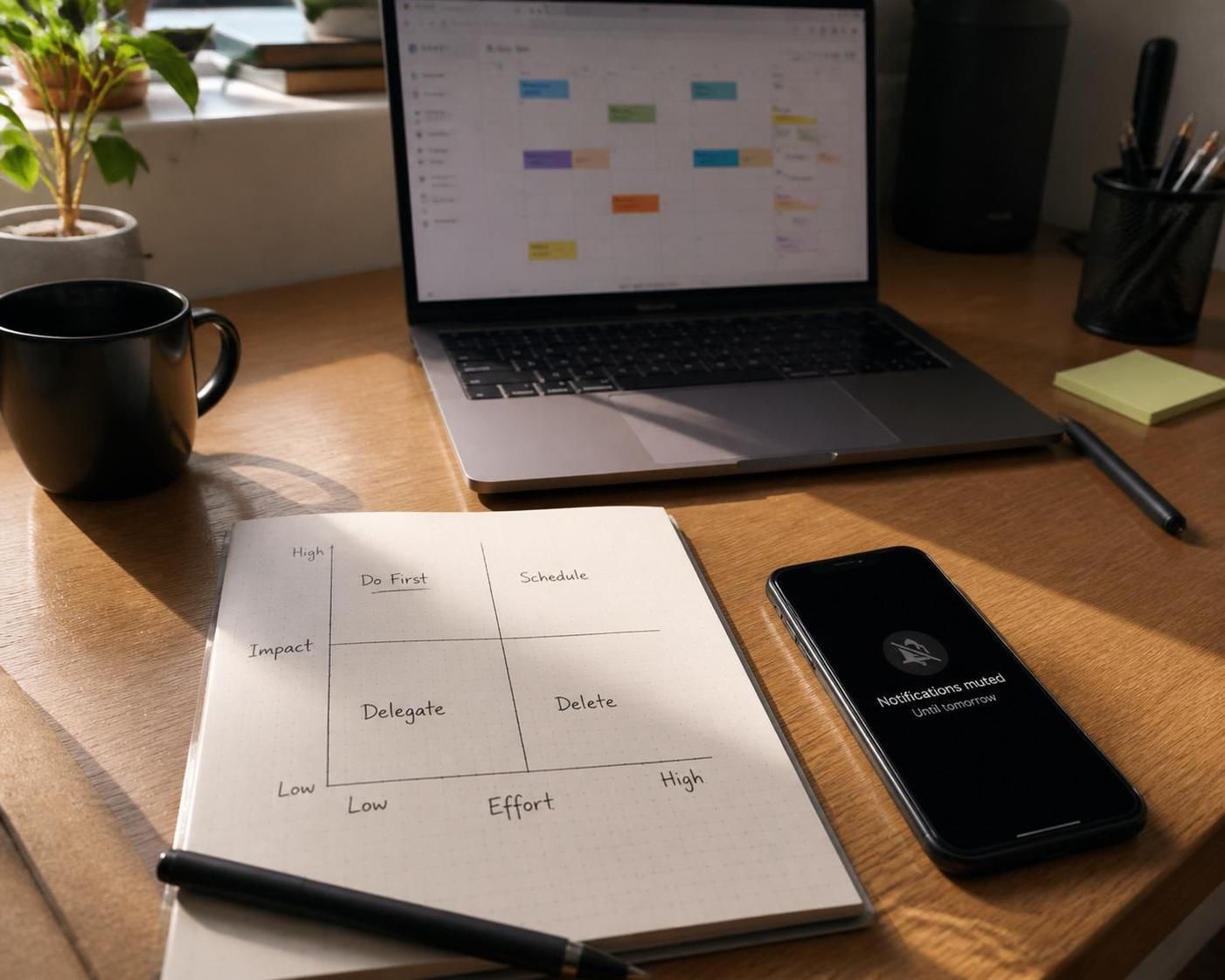
A durable prioritisation approach benefits from a shared language. The urgency-importance lens, often taught as a four-zone matrix, provides that language. It supports goal setting because it connects daily actions to outcomes. Moreover, it improves team coordination because people can discuss trade-offs without personal judgment.
Zone 1 holds urgent and important work, such as outages, safety incidents, and true deadline commitments. Zone 2 holds important but not urgent work, such as training, relationship building, process improvement, and preventive maintenance. Zone 3 holds urgent but not important work, such as many interruptions and some meetings. Zone 4 holds neither, which includes time sinks and avoidance behaviors.
Bad weeks inflate Zone 1. That is normal. However, the hidden failure happens when Zone 2 disappears for too long. When you stop doing preventive work, the system produces more emergencies. Therefore, First Things First planning always protects a small amount of Zone 2, even in crisis. That may be 20 minutes of documentation, a short coaching conversation, or a brief review of a risk log.
How to keep Zone 2 alive during a bad week
Think in “micro-investments.” Instead of a two-hour improvement project, do a 15-minute preventive step daily. For instance, Dana adds a daily “stability sprint”: one small fix that reduces recurring tickets. Consequently, the team sees fewer repeat issues by Thursday, which frees time for customer follow-up.
Another tactic is bundling. Pair a Zone 2 activity with an unavoidable routine. After the daily standup, spend five minutes updating the runbook. After closing an incident, capture one learning in the post-incident notes. These small moves compound, and they build resilience because they reduce future chaos.
Making trade-offs visible with a “not doing” list
Planning often fails because it only lists what will be done. Yet a bad week demands explicit de-scoping. Create a “not doing” list for the week. It might include optional reports, lower-impact requests, or perfection upgrades. Then share it with affected stakeholders. This is stress management through transparency.
In addition, use “definition of enough.” Decide what quality level meets the need today. A one-page brief may replace a 20-slide deck. A temporary workaround may replace a full redesign. These choices protect efficiency, because they match effort to value.
The key insight is that the matrix does not judge you for being in Zone 1. Instead, it asks you to stop living there by default. Next, the principle must extend beyond work outputs, because human energy sets the ceiling on productivity.
Resilience and stress management: sustaining productivity without sacrificing recovery
A prioritization system that survives a bad week must treat humans as part of the system. When sleep drops, nutrition worsens, and movement disappears, cognitive performance declines. Consequently, task management gets sloppy, and mistakes create more work. Resilience comes from designing recovery into the week, even in small doses.
Start by labeling recovery as operationally important. A 10-minute walk, a proper lunch, or a brief decompression after an incident improves decision quality. Moreover, it reduces emotional reactivity, which protects relationships when stakes feel high. Recovery is not a reward for finishing. It is a prerequisite for finishing well.
The “one deliverable, one recovery” rule
During crisis periods, aim for one meaningful deliverable block and one deliberate recovery block each day. The deliverable block advances a priority outcome. The recovery block restores capacity. This pairing keeps productivity stable, because it prevents the day from becoming an endurance test.
Dana uses this rule after a difficult customer escalation. Right after the call, Dana schedules a 12-minute reset: water, short walk, and two minutes to write the next action. Therefore, the nervous system settles, and the next task starts with clearer focus.
Communication habits that reduce stress across a team
Bad weeks create social stress. People fear blame, so they hide problems. First Things First leadership counters that with clear, calm updates. Use short messages: what happened, what matters, what is next, and when the next update will come. As a result, rumors shrink and people can concentrate.
Also, assign a single incident owner per issue. That avoids duplicate work and contradictory communication. However, do not confuse ownership with doing everything. Ownership means coordinating, delegating, and escalating as needed. This approach supports efficiency because it reduces collisions.
When personal life disrupts the plan
Many “bad weeks” are personal, not professional. A family emergency, illness, or caregiving gap can cut available hours in half. In that case, shrink the plan without abandoning it. Pick one must-do outcome, notify stakeholders early, and reduce scope aggressively. Consequently, you maintain trust even when capacity drops.
Finally, watch for warning signs of overload: irritability, forgetfulness, and a constant sense of urgency. When those appear, the system should trigger a reset. Cancel one meeting, ask for help, or delay a nonessential deadline. The insight is direct: resilience is a set of decisions, not a personality trait.
How many priorities should be set for a single day during a bad week?
Limit daily priorities to three outcomes. This cap improves focus and forces real trade-offs, which strengthens time management under pressure. If everything stays “top priority,” prioritization collapses into reacting.
What if urgent requests keep interrupting planned work blocks?
Create an escalation rule: only defined emergencies can break a protected block. For other requests, route them into a triage window later in the day. Moreover, respond with options: deadline shift, scope reduction, or resource trade. This keeps task management realistic.
How can important but non-urgent work survive a crisis week?
Protect small Zone 2 “micro-investments,” such as 15 minutes of documentation, coaching, or preventive fixes. In addition, bundle these steps to routines, like capturing one lesson after each incident. This planning style builds resilience by reducing future emergencies.
Is First Things First compatible with modern productivity tools and apps?
Yes, because the principle is tool-agnostic. Use any app to capture tasks, then apply the same decision rules: define three outcomes, protect focus blocks, maintain a holding zone, and create a visible “not doing” list. The value comes from prioritization behavior, not software features.

With over 30 years of experience, I specialize in streamlining operations and enhancing productivity. As an Operations Consultant and Editor at EfficientToDoList.com, I am passionate about helping individuals and organizations manage their tasks more effectively.